
Form Analytics: How to Analyze and Improve Online Forms
Understand how users interact with your forms, identify where they struggle or abandon, and find opportunities to improve completion rates
What is form analytics?
Form analytics is the collection and analysis of data showing how users interact with online forms at page and field level. It reveals where people abandon, which fields cause friction, how long users spend on each field, the errors they encounter and which fields they return to or correct.
Form analytics helps teams move beyond overall form conversion rates to understand why users struggle or abandon. By analysing behaviour at individual field and session level, businesses can identify UX problems, prioritise improvements and increase form completion rates.
Zuko is a specialist form analytics platform that has tracked millions of sessions across thousands of forms for hundreds of businesses. It provides field-level behavioural analytics and session replay to identify friction in forms and checkouts.
What does form analytics measure?
Form analytics tracks a number of metrics designed to help you diagnose the user issues that are causing people to drop off your form. Specifically:
- Form views - how many visitors reach your form page
- Form starts - how many visitors interact with the form in some way
- Form completions - whether visitors successfully complete the form
- Form abandonment - the number of people who drop out of the journey without completing the form
- Field abandonment - which questions cause people to drop-off the form
- Field returns - which fields people return to to make corrections
- Field time - how long users spend answering each question
- Error messages - which errors are triggering and when
- User flow - how the user moves through your form
- Friction score - whether there is a behaviour difference between form abandoners and completers
How is form analytics different from google analytics?
Google Analytics can show you what happens around a form: how many visitors reach it, where they came from and whether they ultimately convert. Form analytics goes much deeper into what happens within the form itself. It tracks behaviour at individual field level, revealing where users abandon, which fields take the longest to complete, where errors occur, which questions users repeatedly return to, and how they move through the form. The two are therefore complementary: Google Analytics helps identify which pages or journeys have conversion problems, while form analytics helps explain what the form issues causing abandonment actually are.
Why form analytics matters
Zuko’s form benchmarking data shows that roughly two thirds of all form starters never successfully complete the form or checkout. That means a significant share of marketing spend is wasted not because users change their mind, but because they cannot get through the form. Form analytics helps you find and fix the specific fields and UX issues that are driving those abandonments.
Most online journeys end in a form – buying a product, applying for a mortgage, getting a quote, signing up for a service, or applying for a job. Forms demand more effort and attention than almost any other part of the funnel, so when they are confusing or badly designed, users simply give up.
What does form analytics software do?
A form analytics platform measures field‑level behaviour inside your online forms and turns it into clear, actionable insight. Zuko records a stream of events from each user interaction and automatically turns them into metrics that highlight where your forms are working and where they are failing.
With form analytics you can:
- Track form views, starts, completions, and abandons for every form.
- See which fields cause the most friction, corrections, and errors.
- Measure time spent per field and per step to spot bottlenecks.
- Identify where users drop out and how far they get before abandoning.
- Compare behaviour across devices, traffic sources, and audiences.
Traditional web analytics tools like Google Analytics or Adobe Analytics focus on page‑level behaviour. Form analytics goes deeper into the micro‑interactions inside your forms and checkouts, where the decision to convert actually happens.
Want to get started with Zuko?
Zuko is the best form analytics platform available on the market. Find out more about our innovative platform by taking a product tour
Why use dedicated form analytics (not just GA4 or UX suites)?
Some UX and analytics suites include basic form tracking alongside heatmaps, surveys, session replay, and funnels. While that seems convenient, there are important limitations if forms are critical to your business.
Tracking complex forms
- Many “all‑in‑one” tools can only track simple, single‑page forms on static URLs.
- Logged‑in journeys, single page applications, conditional fields, and dynamic steps often break their form tracking.
- Zuko focuses solely on forms, so it has been engineered to work reliably with complex, multi‑step and dynamic form builds.
Depth of form analytics insight
- Generic tools may show basic completions and drop‑offs but provide limited field‑level metrics.
- They often cannot answer questions like “Which error messages did mobile users see?” or “How much time did abandoners spend in this postcode field?”.
- Zuko gives you deep field‑level form analytics so you can understand exactly what is going wrong for different user segments.
You can build some custom tracking into GA4 by firing events when users enter or leave fields, but it usually requires developer time and still produces a limited, hard‑to‑interpret view of form performance. Combining broad analytics like GA4 with specialist form analytics like Zuko gives you the richest insight.
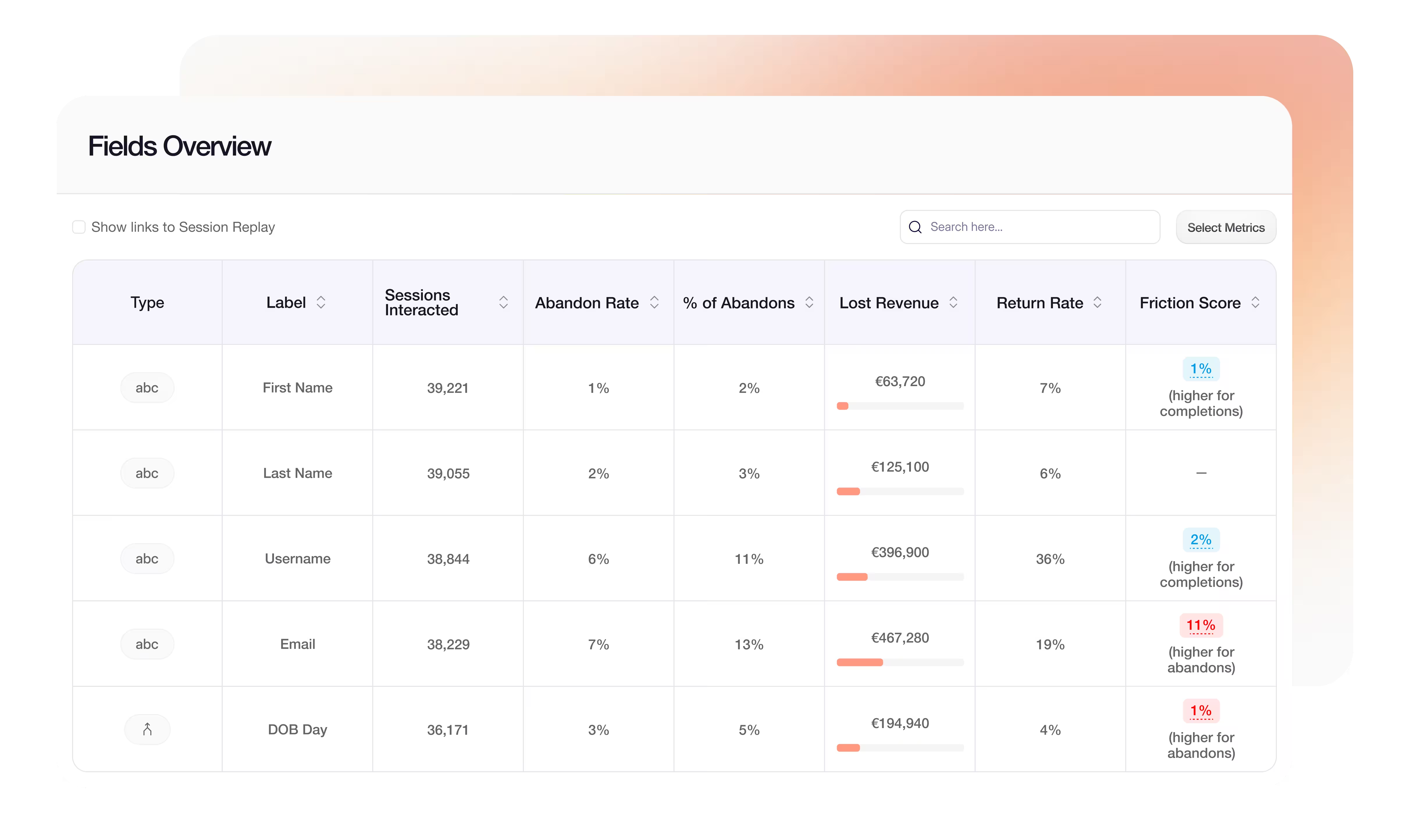
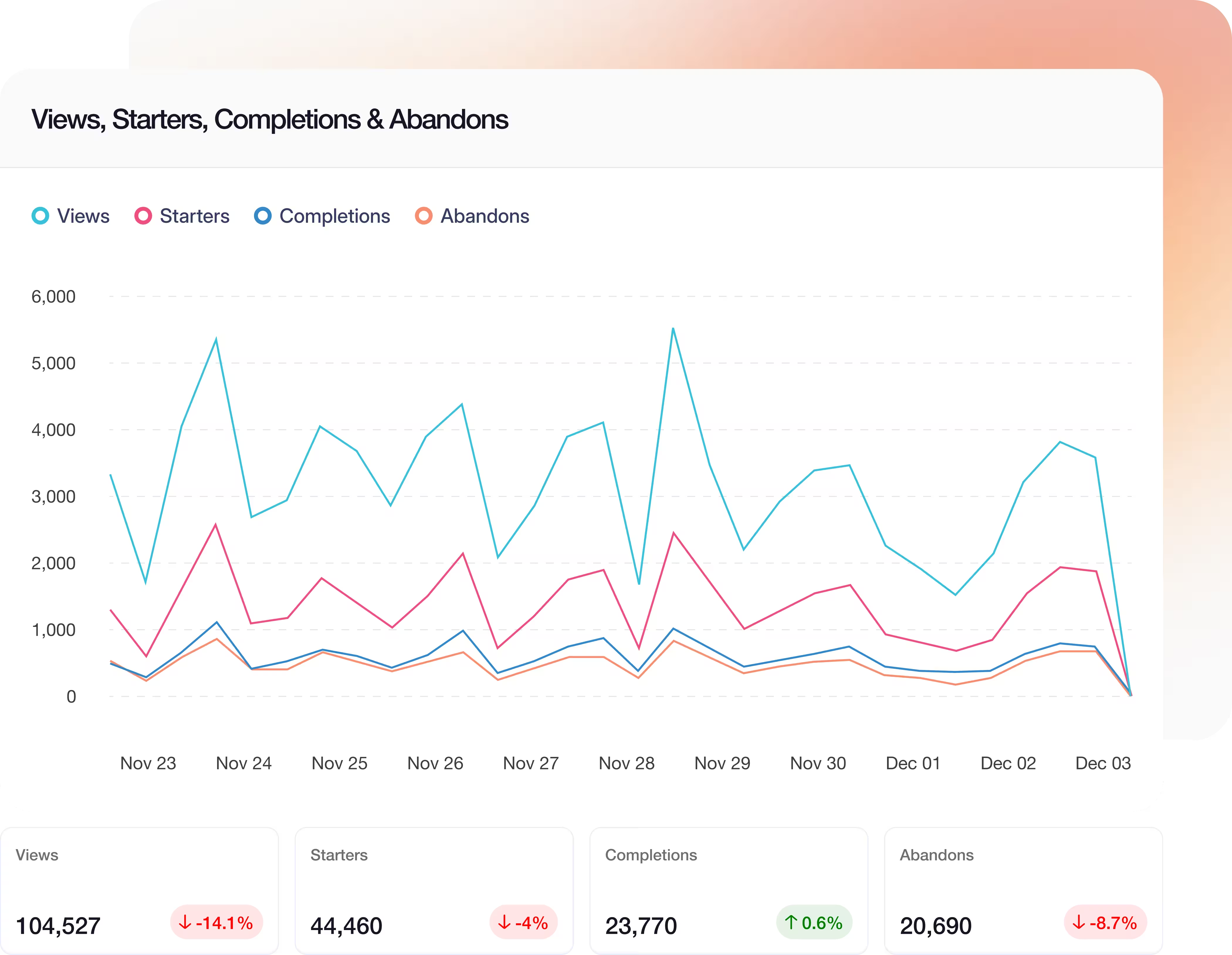
Zuko gives you a full set of form analytics metrics out of the box so you can quickly understand performance and prioritise improvements.
You can measure:
- Views, starters, completions, and abandonment rate per form and per step.
- Field‑level abandonments and the percentage of total abandons each field causes.
- Time spent per field and per visit, including hesitation time.
- Error rates, error messages, and how often users correct or re‑enter fields.
- Return rate to fields, showing where people get stuck and come back repeatedly.
How form analytics improves conversion rates
Form analytics improves conversion rates by showing where and why users struggle within a form. Instead of relying on overall abandonment figures, teams can identify specific fields, validation errors and steps associated with friction or drop-off.
These insights can then be used to prioritise changes such as simplifying difficult questions, improving error messages, removing unnecessary fields or changing the order and structure of the form. Teams can measure the impact of those changes using completion rate and field-level behaviour, creating a continuous cycle of identify, improve, test and measure.
Zuko brings these metrics together in dashboards and visualisations, helping product, UX and optimisation teams identify the highest-priority opportunities.
What’s the difference between form analysis and form analytics
Essentially, form analytics is the process of tracking user behaviour data on forms and displaying it in a readable way. Form analysis is the process of interpreting that data and using it to work out how to improve the user experience of the form.
For a beginners guide to form analysis you can read our comprehensive blog post: Form Analysis Basics
Key form analytics metrics you get with Zuko
Conversion Rate Optimization (CRO) is about increasing the percentage of visitors who achieve a desired goal, such as completing a purchase, quote, or application. Many CRO programmes focus on landing pages and product pages, but the biggest opportunity often lies in the form or checkout itself.
Zuko’s benchmarks show that, on average, around two thirds of visitors who start a form never complete it. Improving forms and checkouts with data‑driven changes can therefore unlock a large amount of hidden revenue without increasing traffic.
Form analytics helps you:
- Reduce friction in critical fields that cause confusion or errors.
- Simplify layout and copy where users hesitate or stall.
- Remove unnecessary fields and steps that increase effort without adding value.
- Design and test alternative form journeys with higher completion rates.
A step‑by‑step form analytics process
The goal of form analytics is to turn behavioural data into a continuous optimization programme.
1. Learning phase
- Decide on a minimum data window, often around one month to cover a full business cycle.
- Install Zuko and start capturing form analytics data across your key forms.
- Exclude internal teams (marketing, development, QA) so your dataset reflects real customers.
2. Improve and measure phase
- Use Zuko to identify the biggest issues: high‑friction fields, steps with high drop‑off, confusing error messages.
- Build hypotheses about why visitors are dropping out and create a prioritised list of changes and tests.
- Run A/B tests or controlled changes, segment variants inside Zuko, and measure uplift using your form analytics metrics.
3. Continuous optimization phase
- Treat form analytics as an ongoing process, not a one‑off project.
- Review performance regularly, especially when campaigns, traffic sources, or audience demographics change.
- Keep iterating on copy, layout, validation, and field strategy based on your latest form analytics data.
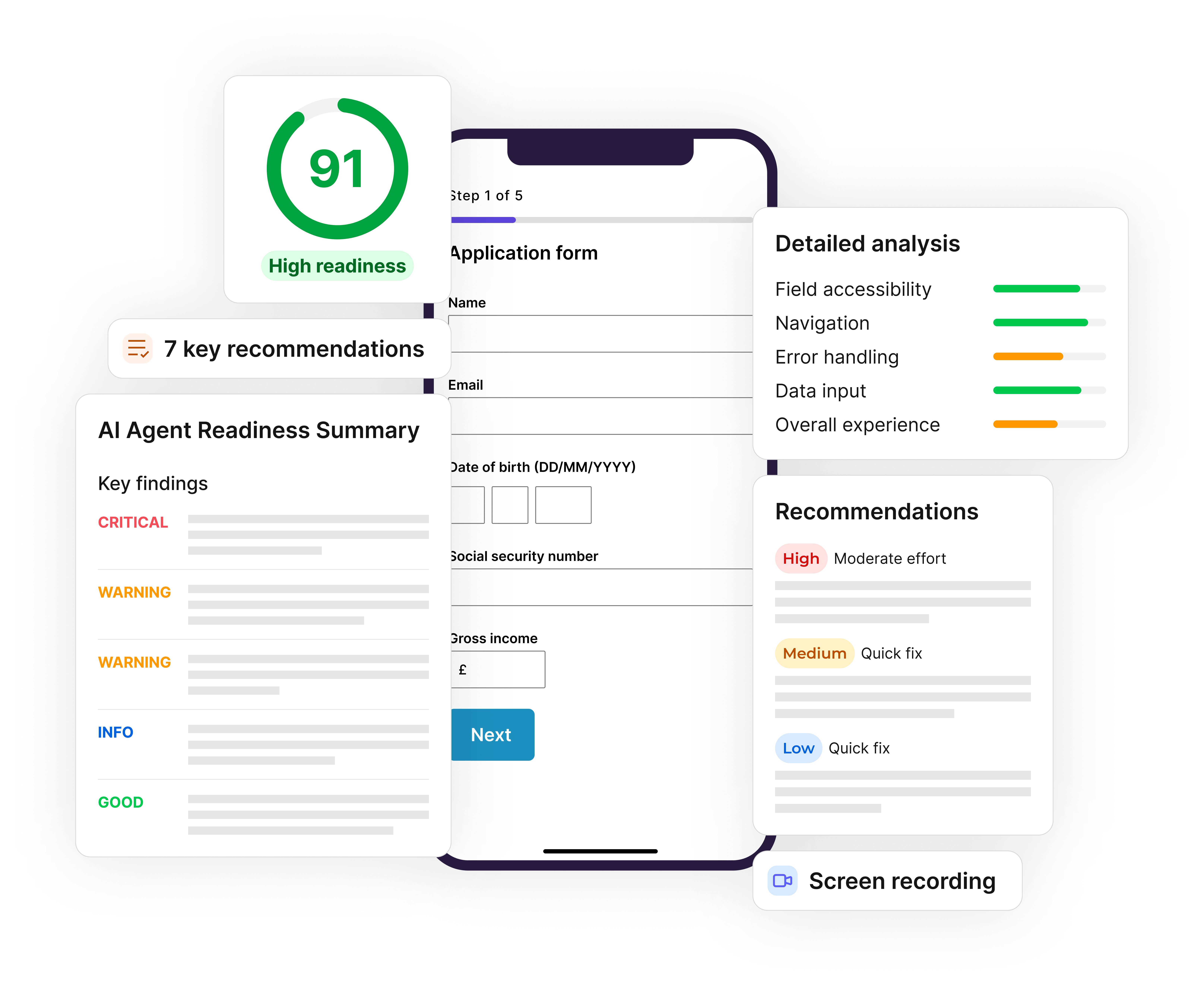
Is your form ready for AI agents?
AI assistants are completing forms and checkouts for users. Zuko Agent Score identifies where they fail and how to fix it
(No Credit Card Required)

Will form analytics slow down my site?
A well‑built form analytics platform should not slow down your site. Zuko is delivered via a fast CDN so visitors receive the JavaScript from a location close to them, and tags can be deferred to load just after the page.
Zuko typically processes around 1,600 pieces of data per engaged form visitor, sending events in efficient chunks to minimise latency. If performance is critical to your business, you can review Zuko’s technical documentation to see how we handle speed and infrastructure.
How does Zuko protect customer data?
Form analytics focuses on user behaviour, not the personal data users type into your forms. Zuko is GDPR‑compliant by design and does not capture the actual characters entered into fields.
Instead, Zuko records that a key was pressed and whether it was a letter, number, or special key (such as delete or backspace), without storing the contents of the field itself. Zuko also does not store IP addresses, and end‑user session data is anonymised so individual people cannot be identified. You can read more in Zuko’s data privacy and security overview.
How to start using Zuko form analytics
If forms are central to your business and most of your site’s value flows through them, you will benefit from specialist form analytics software. Zuko has been purpose‑built to track all types of forms and to give you unparalleled insight into where and why users struggle.
You can:
- Start a free trial with full access to all form analytics features.
- Book a demo with our team to see your own forms analysed live.
- Download our “Big Guide to Form Optimization and Analytics” to go deeper into form optimization strategies.
Ready to start getting insight into your online forms?
Start a free trial that includes all features, or request a demo